
Have you ever felt like your entire week was full, yet you still didn’t complete all your tasks? I know how you must have been feeling at that moment!
You pencil in all your work in your weekly planner and wake up with good intentions. And by Thursday, you’re still chasing yesterday’s priorities somehow while today’s to-dos stare at you like tiny judgmental faces.
After all, being busy doesn’t always mean you’re being (or were!) productive. You can be behind even when your weekly planner is already full.
But do you know why?
That’s because “task priority isn’t the same as task quantity.”
Well, the good news is you can easily be a person who actually gets somewhere with only a few right steps. All you need to do is decide what matters most this week and follow some proven strategies.
Eager to explore how to prioritize tasks in a weekly planner? Let’s dig in!
Why Prioritizing Tasks Is the Only Productivity Tool You Really Need #

Most productivity issues don’t stem from time constraints. Simply put, it’s more about choice than time.
Remember this:
“You only have so much attention, energy, and time each week. What you choose to actually put in your planner decides what gets done.”
And no, it’s not pressure, but clarity!
Without setting priorities, a long to-do list can quickly turn into:
- Procrastination
- Decision fatigue
- And burnout
Research also shows that the more people feel they have control over how they use their time, the more satisfied they are with their work-life balance.
In other words? Prioritizing makes your whole week feel doable and helps you avoid chaotic pressure and time drills.
5 Winning Techniques to Prioritize Your To-Do List With a Planner #
How do you prioritize and manage your tasks and projects plays a big role in keeping up your work-life balance. So, here are the top winning task prioritization techniques you shouldn’t miss out on:
- Technique 1: Start With Outcomes, Not Tasks
- Technique 2: Use the Priority Pyramid
- Technique 3: Put Musts On Your Calendar First
- Technique 4: Assign Time Limits for Management
- Technique 5: Review, Reflect, & Adjust Your Tasks
Let’s go into detail.
Technique 1: Start With Outcomes, Not Tasks #
Sounds weird, I know. But hear me out.
Instead of starting your week with your tasks, it’s wiser to start with outcomes.
Ask yourself:
- “What result do I want by the end of this week?”
- “What would make this week feel complete & successful?”
- “What would I be proud to tell someone I achieved?”
Here’s an example of how the outcomes would look:
- “Prepare a full draft of the client proposal.”
- “Finish studying or reading with proper notes.”
- “Have quality time with family without guilt.”
- “Built structure for next month’s main goals.”
Understand that your tasks are your actions, and outcomes are impact.
And when you’re familiar with the impact you desire, tasks begin to arrange themselves instead of you trying to force them into a mold that doesn’t even fit.
Technique 2: Use the Priority Pyramid #
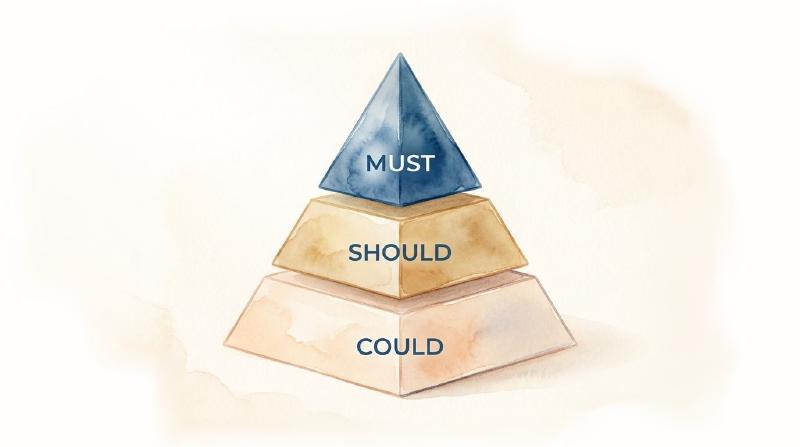
You can also use a little trick to separate the overwhelmed from the fulfilled. The three possible levels you should consider are:
Must - The “Must Really Happen” This Week
These are the main priorities that highly matter, such as commitments with others, deadlines, or work deliverables. You can also include personal responsibilities (appointments, bills, etc.) under this label.
Should - High-Value But Also Flexible
Just sit and think of the tasks that make your life better, but at the same time, they can wait a little sometimes. Those are the things that will come exactly under this section. Some examples can be learning or study blocks and workout sessions.
Could - Nice-to-Do Yet Not Compulsory
In case you have time left from the day, the “could” tasks can be done at your own pace. This can involve small chores, errands, miscellaneous tasks, quick market visits, and optional creative work.
Why is it important, though?
See, when you place all tasks in one place, that creates a mess, and you end up with “must” tasks unfinished. Thereby, this strategy can be your lifesaver!
Technique 3: Put Musts On Your Calendar First #
Done with making the categories?
Now, let’s accept a fact. That is, your brain tends to choose “comfort over conflict” if left to its own devices.
And you know what it means? It shows that you’ll possibly:
- Do the most convenient tasks first
- Scroll recklessly rather than taking action
- Avoid hard work and crucial tasks until later
The solution? Put your “Musts” at the top of your schedule. Or else, you’ll regret it later. Write them down in your planner before anything else. I repeat!
Put them first, even if they feel hard, and even if you’re not in the right mood.
Because blocking them mentally prepares your brain and tells you, “We are doing this week with intention.”
Technique 4: Assign Time Limits for Management #
Time blocking is a method where you plan and assign time slots to specific tasks.
Once you’re done prioritizing it all, it’s time you use your weekly planner to block time depending on the task’s importance.
Because in the end, humans are weird creatures…
Give us unlimited time, and we’ll gladly take all of it.
That’s called Parkinson’s Law, which states, “Work expands to fill the time available for its completion.”
So if you give yourself all morning to write a report… guess what? It will take all morning, even if it didn’t have to.
Instead, putting a reasonable time block does two major things:
Number 1. Keeps you highly focused
Number 2. Forces you to respect your energy blocks
Here’s an example of time blocks:
| Draft proposal | Block Length |
|---|---|
| Emails | 30 minutes |
| Workout | 60 minutes |
| Meal prep | 45 minutes |
Technique 5: Review, Reflect, & Adjust Your Tasks #

Prioritization shouldn’t be a one-and-done weekend ritual.
Each week, spare 10-15 minutes (yes, even if you didn’t finish everything) to review your to-do list and adjust priorities as needed.
Now, reflect on the following points:
- What got done this week?
- What didn’t go as planned?
- Was I entirely honest with my “musts”?
- Did I protect all my high-energy hours?
- Did anything unexpected teach me something?
This way, you’re going to give yourself feedback for improvement. Not only this, daily reviews also keep your planner organized and ensure your priorities are aligned with your goals.
Bonus Tip: Revisit your to-do list every week, month, and year, too, for adjustments according to your changing circumstances, so everything flows well.
5 Daily Layouts That Make Priorities Obvious Instantly #
Once you’ve figured out what deserves your attention, the next hurdle is making sure those priorities don’t disappear quietly under other tasks. And that’s why you should never miss out on choosing the right layout that works for you.
So, below are a few simple layout approaches to make prioritizing super easy:
| Planner’s Layout Style | How It Works | Best For |
|---|---|---|
| M-A-E (Morning, Afternoon, Evening) | “Breaks the day into natural energy phases to place the tasks where they’re likely to get done.” | People who want flexibility and not rigidity |
| Priority-First (Vertical Focus) | “Reserves the first half day or week for priorities, with less crucial tasks to be done afterwards.” | Those who want priorities to be impossible to neglect |
| Split Focus (Work & Home) | “Separates personal and professional priorities into different sections within the same day.” | Individuals looking for work-life balance |
| Daily Priority Highlight | “Creates a dedicated room for the top 2 or 3 non-negotiable tasks of the day.” | People overwhelmed by long to-do lists |
| Hourly with Priority Anchor | “Efficiently combines time blocking with a highlighted priority section that stays visible all day.” | Someone who seeks structure without losing focus |
Practical Tips for Successful Weekly Planning #
Want to make the most out of your weekly planner? In addition to following the task prioritization matrix, other strategies can help with planning.
Here we go:
-
Break Down Tasks: Don’t list vague tasks, such as “work on project,” on the planner. Break them into more manageable, smaller actions. You should write “research for presentation” or “write the introduction” to make tracking progress easier.
-
Plan Ahead: Spare time each week to make your upcoming schedule. On Sundays, one can take a few minutes to highlight the tasks of the week and prioritize what has to be done at all costs. This gives your mind more clarity.
-
Be Realistic: It’s very easy to get excited at first and overfill the schedule. But see, productivity is not about quantity. Always focus on quality work and be realistic about what you can accomplish in a week.
-
Include Short Breaks: Your weekly planner should include not only work-related activities but also personal time. That’s why it’s mandatory to schedule breaks to recharge well and ensure that you stay consistent with productivity all week.
Bottom Line #
That’s all about how to prioritize tasks in project management! Just remember that if planning is the frame, then prioritization is your bigger picture.
A weekly planner without set priorities is like a map without destinations, getting you nowhere. You keep moving, but nothing seems meaningful.
But once you decide what actually matters, everything begins to fall into place.
If you also want to live your life with purpose and value, making intentional choices should be a “never-compromised thing” in your routine.
Frequently Asked Questions #
Q1. Which other tool is commonly used for prioritizing tasks? #
The Eisenhower Matrix is one of the most effective task management tool that helps you prioritize and organize tasks by importance. Using this tool, you can divide your tasks into 4 boxes according to the tasks you will do first, the tasks you will delegate, the ones you will delete, and the ones you will schedule for later.
- Important & Urgent (Must-do: Immediate crises)
- Crucial but Not Urgent (Schedule: long-term, strategic goals)
- Urgent but Unimportant (Delegate: meetings/interruptions)
- Neither Important nor Urgent (Delete: distractions)
Q2. What is the 3 3 3 rule for tasks? #
The Top 3 3 3 rule is effective for task management. It means you spend 3 hours on your highly important tasks. Complete 3 quick and short tasks that are crucial but maybe being avoided. And then, end your day with 3 routine or maintenance tasks.
Q3. How do you prioritize tasks when managing multiple projects simultaneously? #
Prioritizing different projects at a time requires attention to high-impact tasks. For such situations, you should set clear goals and use methods like critical path analysis and the Eisenhower matrix. Manage capacity by categorizing your tasks and time-blocking on your calendar.